
Solid Explorer 2.0
Welcome to Solid Explorer support forums!
- or
No existing idea results
- ~ No ideas found ~
11875 results found
-
A New Google Drive Login!
Hi friends!
I love Solid Explorer. The option to drag files to other folders is amazing! The Cloud Manager too.
I only have one suggestion at the moment (although I use Android 4.4 and I do not know how it happens in other versions):
Google Drive login could be done "via browser" without havin to connect a new account in the device.
I do not see this as a problem, but separate device login would be better.
Thank you very much!10 votes -
MyCloud support
What needs to happen to get support for additional services like my Western Digital MyCloud NAS server?
12 votes -
Adding tags to files and folders for easy search
The index search is great but I think the ability to add tags to files and folders would be great. Lets say you're looking for a document related to physics, but has a different name. Well by writing out "physics" we can see everything related to that custom category we've created. We see anything we've added that tag to (Word documents, Excel, PDF, folders, etc.)
7 votes -
Add "Computers" on Google Drive
Google Drive had update, it's can choose any folders on computer to sync (Which is not just the "Google Drive" folder again).
And on the Google Drive web, it add "Computers" shortcut on right menu.
So, it should add the "Computers" selection on Solid Explorer, similar the "Shared with me" selection.
71 votes -
Accidentally copied a folder over itself: everything is 0KB now
This is actually a huge problem, and I'm not doing anything with my phone until I've recovered the files.
Basically, I have a folder on my Internal Storage on which I work, and a similar folder on SD Card where I copy all the files from time to time because I run out of space in Internal Storage (then I copy the files from SD card to my computer).
Today I wanted to do it.
I opened the parent folder in Internal Storage on left screen, and parent folder in SD Card in the right screen.
In the left screen, I selected the folder I wanted to copy, pressed Copy, went to the right screen, and pressed Paste, confirming that I want to replace the existing files.
This went super fast, which shouldn't have happened considering the size of the files. And I realized I had opened the Internal Storage folder in both screens. So basically I copied a folder over itself. Which shouldn't be a problem, normally it should just leave the files the way they are... Except it didn't. ALL MY FILES in this folder have turned into 0KB files. They can not be opened anymore, they're completely empty.
I've just lost 1.25GB of work.This is actually a huge problem, and I'm not doing anything with my phone until I've recovered the files.
Basically, I have a folder on my Internal Storage on which I work, and a similar folder on SD Card where I copy all the files from time to time because I run out of space in Internal Storage (then I copy the files from SD card to my computer).
Today I wanted to do it.
I opened the parent folder in Internal Storage on left screen, and parent folder in SD Card in the right screen.
In the left screen,…1 vote -
Freezing on Nexus Player
Latest update freezes after launch. I've tried erasing cache and data, and reinstalling, and rebooting device. After a new install, after agreeing with EULA, it freezes on the main screen (see attached pic)
4 votes -
Option to hide files and folders in SMB shares
We can hide files and folders while in local or external SD directories but such option is not available while in smb share. When I go in to an smb share hosted on home server I see a bunch of directories with $ in their name. I would like to see an option to hide these.
7 votes -
option to set default character encoding for archives
Its really annoying to every time select "UTF-8" mannually when opening archive which has russian symbols. (if archive contains mostly english file names and only some russian, SE doesnt choses correct encoding automatically, and russian becomes like "?????" ). And those archives I used were created with SE.
3 votes -
Cloud File Manager for onedrive does not work!
Cloud File Manager for onedrive does not work!
4 votes -
Remember SSH key passphrases
It would be really useful to be able to login to sftp servers without having to enter the passphrases every time
17 votes -
2 votes
-
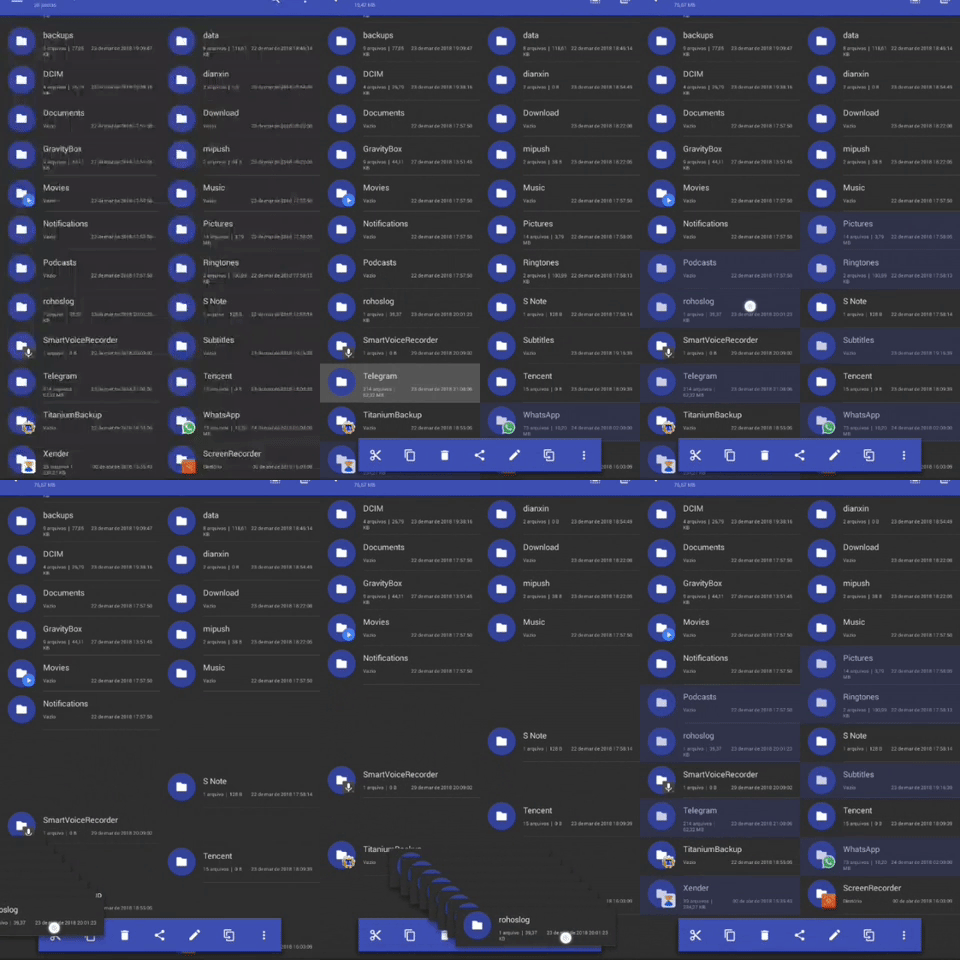
Drag and drop quick actions and customizable context tools orders
I used ES File Explorer for a long time, and I think it was a clever idea to have press and hold then move to the screen corners to Share, Copy, Move, Delete files.
As well as to rearrange context menus (such as copy, cut, move, delete, share, etc) bar icons and actions, you could place it to after you press and hold the selected files, you'd just drag n drop over the icons (showing a confirmation tooltip, like when you press and hold each icon, material design guideline) and do the following.
Got it? I can formulate better in case you need.
Illustration GIF: https://media.giphy.com/media/37QULD5XXouornXzCq/giphy.gif
I used ES File Explorer for a long time, and I think it was a clever idea to have press and hold then move to the screen corners to Share, Copy, Move, Delete files.
As well as to rearrange context menus (such as copy, cut, move, delete, share, etc) bar icons and actions, you could place it to after you press and hold the selected files, you'd just drag n drop over the icons (showing a confirmation tooltip, like when you press and hold each icon, material design guideline) and do the following.
Got it? I can formulate better in…
6 votes -
Power Amp doesn't show up as a music player
Power Amp doesn't show up as a music player choice when selecting a music file. For me it's the only thing that plays music on my phone not on the list. Any chance for this to be fixed?
5 votes -
Select interval
Please bring in option for selecting files at interval. For eg. If I want to select files from 10 to 25 out of 1 to 30, I need to select first and last file i.e. 10 and 25 and hit SELECT INTERVAL option and it will do what it says.
7 votes -
Natural folder sort, like in Total commander
could you please add functionality of separate directory sort like in Total Commander
1. natural sort (now, folder sort like
Folder 1
Folder 10,
Folder 2
Folder 3 etc.
I need
Folder 1
Folder 2
Folder 3
....
Folder 10- Folders sorted separately (i always sort by name)
- Folders first, files last
9 votes -
SE pro battery consumption
Using the trial version, battery monitor indicate SE is using 1.5% of 9.5% usage. So whats the Pro version usage like? I ask this becoz ES file manager consumer some 20% of total and thats the reason I intend to switch to SE pro, if only the battery consumption is reasonably below 5%.
Please advise
1 vote -
Bloqueio por senha e digital
Deveria ter como bloquear o aplicativo com senha e impressão digital.
3 votes -
Size in confirmation box
While deleting file/folder the confirmation box should show the size of that file/folder
6 votes -
Continuously play audio files?
Apologies if this has been asked, or if i am just missing something, but is/can there be a way to play audio files continuously, without manually selecting the next track? As of right now, I have to pull my phone out of my pocket every time a song ends, and select the next one. This is my ONLY "problem". Love Solid Explorer!
53 votes -
Solid Explorer FTP Serever possibility to START or STOP by Automagic, Automate, E-Robot, Lama, Tasker … etc.
Automagic makes my phone much more smarter…
How to manage SE FTP Server by Automagic?13 votes




- Don't see your idea?